← Piezas de nivel 2Objeto 3Dfogon/nivel-boton-de-piso
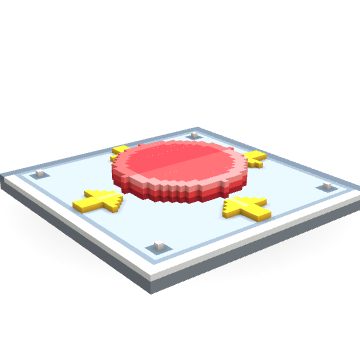
Botón de piso
 Arrastrá para girarlo
// «Botón de piso» · gpt-6-sol (medium)
// A pressure plate button: a flat square grey metal frame 48x48 x 3 thick (full footprint, tiles) with a round red button in the middle, radius 12 and 3 tall, with a lighter red top rim, and four small yellow arrow marks on the frame pointing at it.

// Full-footprint, three-block-thick metal plate.
box(0, 0, 0, 47, 47, 2, "#788592");
box(0, 0, 2, 47, 47, 2, "#aebbc5");

// Crisp perimeter bevel, kept entirely inside the tile.
box(0, 0, 2, 47, 1, 2, "#dce5e9");
box(0, 0, 2, 1, 47, 2, "#dce5e9");
box(0, 46, 2, 47, 47, 2, "#6d7d8a");
box(46, 0, 2, 47, 47, 2, "#6d7d8a");
box(2, 2, 2, 45, 2, 2, "#8798a5");
box(2, 2, 2, 2, 45, 2, "#8798a5");
box(2, 45, 2, 45, 45, 2, "#8798a5");
box(45, 2, 2, 45, 45, 2, "#8798a5");

// Four inset corner fasteners.
for (const x of [5, 42]) {
  for (const y of [5, 42]) {
    box(x - 1, y - 1, 2, x + 1, y + 1, 2, "#667885");
    set(x, y, 3, "#e7edf0");
  }
}

// Chunky yellow arrows, each pointing toward the button.
const yellow = "#ffcf35";
const highlight = "#ffe778";
for (let y = 3; y <= 6; y++) box(23, y, 3, 25, y, 3, yellow);
for (let d = 0; d <= 3; d++) {
  box(20 + d, 7 + d, 3, 28 - d, 7 + d, 3, yellow);
}
box(24, 7, 3, 24, 10, 3, highlight);

for (let y = 41; y <= 44; y++) box(23, y, 3, 25, y, 3, yellow);
for (let d = 0; d <= 3; d++) {
  box(20 + d, 40 - d, 3, 28 - d, 40 - d, 3, yellow);
}
box(24, 37, 3, 24, 40, 3, highlight);

for (let x = 3; x <= 6; x++) box(x, 23, 3, x, 25, 3, yellow);
for (let d = 0; d <= 3; d++) {
  box(7 + d, 20 + d, 3, 7 + d, 28 - d, 3, yellow);
}
box(7, 24, 3, 10, 24, 3, highlight);

for (let x = 41; x <= 44; x++) box(x, 23, 3, x, 25, 3, yellow);
for (let d = 0; d <= 3; d++) {
  box(40 - d, 20 + d, 3, 40 - d, 28 - d, 3, yellow);
}
box(37, 24, 3, 40, 24, 3, highlight);

// Moving, solid red button: dark skirt, bright wall, and a light top rim.
part("boton", [24, 24, 3]);
for (let z = 3; z <= 5; z++) {
  for (let y = 12; y <= 36; y++) {
    for (let x = 12; x <= 36; x++) {
      const r2 = (x - 24) ** 2 + (y - 24) ** 2;
      if (r2 > 144) continue;
      let color;
      if (z === 3) color = "#ad2632";
      else if (z === 4) color = y < 24 ? "#f04448" : "#d8323c";
      else if (r2 >= 94) color = y < 24 ? "#ff9290" : "#ff6868";
      else color = y < 24 ? "#f95659" : "#e9424b";
      set(x, y, z, color);
    }
  }
}
animate("boton", { type: "bob", axis: "z", amplitude: 1, speed: 2 });
import { draw } from "./assets/voxel";
import { nivelBotonDePiso } from "./assets/nivel-boton-de-piso";
// En cada cuadro: parado sobre (x, y), el centro de su base.
draw(ctx, nivelBotonDePiso, x, y, { size: 64, angle: 0, t: performance.now() / 1000 });
// size: lo que mide en px su lado más largo
// angle: giro sobre el piso, en radianes
// t: segundos; si se mueve, se anima solo con eso# En una terminal, en la carpeta del juego
fogon assets add nivel-boton-de-piso
# Con las herramientas de Fogón (conector)
add_assets({ slug: "<tu-juego>", ids: ["nivel-boton-de-piso"] })
# Queda en client/assets/nivel-boton-de-piso.ts
# https://fogon.page/object/nivel-boton-de-piso